Showing posts with label apple. Show all posts

15 May 2015

Fixing the power connector on Apple Cinema Displays (Aluminium)

Author's note: wiring done by dgorbik; writeup by yours truly

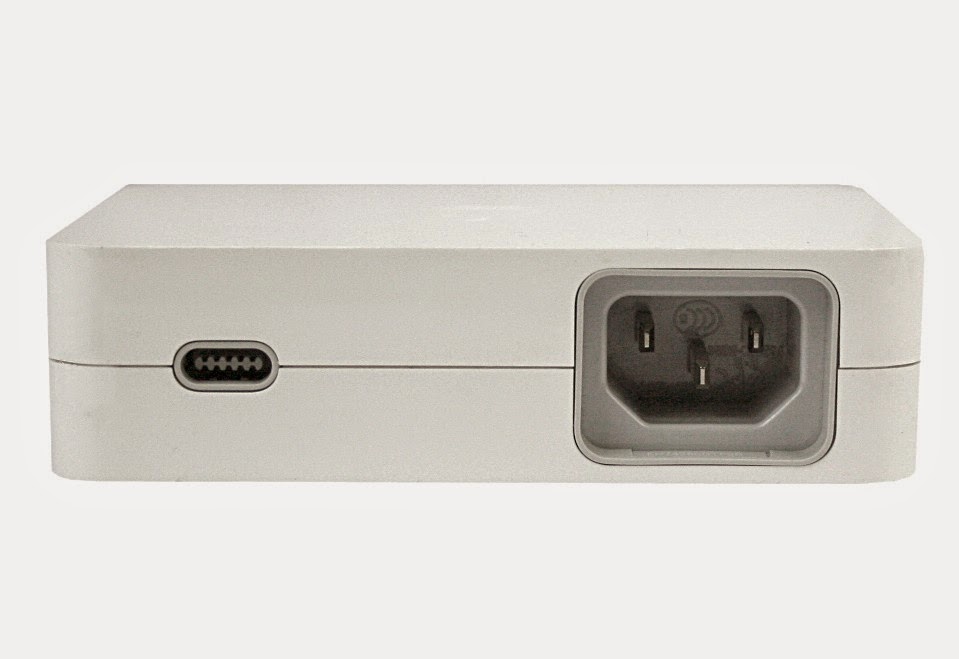
It turns out that after a while, if the power cable from the display is bent near the neck of the plug, the plastic clamshell over the plug will separate. Not only that, the cord will slowly stiffen and any bending motion will detach the wires, shielding, and epoxy from the metal connector. I have no use of a dead display (and am unofficially retired from the display-splicing scene), I gave my dead 30" Apple Cinema Display to my friend.

Not the 150W brick; they look similar. Source: Google Images.

It also turns out that the Cinema Display power connector looks very similar to that of the first generation Mac mini. Recall that the mini used an external 85W power supply, where one end was a reversible female 10-pin connector (2 sets of 5 pins) and the other end was an IEC Mickey Mouse connector. In fact, that 10-pin connector is, empirically, identical to the one used on the Cinema Display. I had one of those bricks so I gave it to my friend. He quickly cut both cables, revealing a red and black cables, and a thinner gray cable within the shielding.

Source: Google Images.

Simply color matching and soldering the cables didn't do the trick. My friend and I tried 3 different power bricks (150W), 3 different graphics cards, and 2 computers to no avail. Metering the donor cord appeared to give a bad reading, but turns out the wiring was backwards! (Tsk tsk Twiggy/Q88 team). So soldering black to red, red to black, and ignoring the gray wire worked.

Source: friend.

24 July 2013

Uniforms

Jobs suggested everyone at apple wear the uniforms but they all disagreed and booed him off the stage.
Imagine if everyone at Apple wore black turtlenecks, blue jeans, and New Balance 991 sneakers.

27 June 2013

Why hello there, Mac Pro

I bought a [single processor] Mac Pro on a whim (go figure). My intention was to see whether the Mac Pro 1,1/2,1 heatsink works in the Mac Pro 3,1 models. However, to my delight, the computer came with a magical second processor!


Turns out the computer was from a university. Maybe I should have waited for MIT to throw some out!

Feel free to scan the barcode.

Temporary setup. It probably should not live in front of my dresser.

That's a G5 carcass behind the Mac Pro.

Also, Apple certified FB-DIMMs are legit.

I <3 911s

07 November 2012

iPad mini Impressions

I went to the Apple Store in Legacy Place the day after launch day to check out the newest tablet in town. The same weekend (actually on launch day), I received my iPad 4, an early Christmas present from the parents.

Of course, iPad mini was sitting on a table near the entrance. I picked up the unit closest to me and started playing around with it. Immediately I noticed how light it was; its thinness came second. Its svelte proportions begged me to fit it in my pocket. Surprisingly, it did! (At least in my ski jacket pocket. It went only halfway into my pants pocket. Clearly I should get real cargo pants.)

I then investigated its usability. Upon waking the device, I noticed the blurriness of the clock and app names. Icons were smaller, but still plenty touchable. I then pulled up some scientific papers, but the unfortunate combinations of large margins and smaller and blurrier text heavily outweighed the size and weight of the device. Although I was decided on the iPad 4 at this point, I did my handwriting and typing tests for sake of completeness: I opened up the Paper app and started writing. While a 4:3 ratio is optimal for these smaller devices, 7.9" diagonal does not provide sufficient surface area for writing notes without constantly flipping pages. Yes, I do handwrite my notes on iPad with a stylus, and it works remarkably well. The typing test went surprisingly well; while the keys are considerably more cramped than those of the iPad 4, I was able to type surprisingly quickly (~50wpm).

My impression of iPad 4 is more positive. The retina display is absolutely gorgeous. Also noticeable is the increased weight from iPad 2; while it is heavier, it will be lying on a flat surface most of the time for writing notes. The device does get warm under heavy use (games), in particular, like the iPad 3, the bottom left gets noticeably warm. Perhaps the best change is the speakers (yes, there are two speakers behind the grill); they are significantly louder, maybe on par with those in MacBooks.

The iPod touch is pretty nice, but the iPad nano was pretty bleh. What in the world was Jony Ive thinking?! I'm slightly convinced that it was designed by the marketing team. Ha.

That's all for now; I'll report back if I notice more worthwhile tidbits.

09 October 2012

iPhone 5: First Impressions

The phone comes in immaculate packaging, as with any Apple product. I believe the iPhone 5's box is moderately smaller than that of the original iPhone's. Inside the box, you will find the iPhone 5 sitting at the top layer, underneath a packet of manuals other textual paraphernalia, and finally a 5W USB charger, Apple EarPods, and a Lightning cable.

I immediately saw two imperfections with my phone, both at the lower right on the aluminum. They're at most 0.5mm wide; I don't own a micrometer or have one handy, but they're certainly less than a millimeter in width. That said, I will not be exchanging the phone or putting it in a case.

When you pick up the phone, you notice how thin and light it is. 0.8oz is nothing impressive on paper, but it is very tangible in your hand. In addition, the thinness of the phone is tangible as well, but not as much as the lack of weight.

The phone boots very quickly in about 7-10s. You are then greeted by the setup assistant, which works just like the one in iOS 5. I restored my phone using my iPad 2's backup on iCloud, which took no more than two minutes.

Moving around in iOS 6 is very zippy. I haven't yet felt any lag navigating around or while using apps. Gaming is butter smooth as well; Real Racing 2 flies, although extremely cramped on a phone compared to on iPad. The phone stays cool while gaming.

I have noticed one glitch, probably caused by video drivers, but it might be hardware related. The screen will display about 5 rows of scrambled lines when I switch between the numbers keyboard and the qwerty keyboard while typing my password for the App Stores. This bug is pretty hard to reproduce; it's only happened three times to me so far.

I also noticed that the phone gets quite warm while browsing on LTE. The aluminum especially acts like a fantastic hand warmer (will definitely be useful for the upcoming Boston winter).

Battery life has been great as well. I got a bit more than 10 hours of use surfing the web, playing some light games, and listening to 5 hours of music on and off. Push Exchange was on the entire time. I predict that I will have to charge the phone every 1.5 days, compared to every night with my previous phones (iPhone, Dell Streak, HTC HD2).

The included EarPods are decent. They have more bass than Apple's in ears, but cannot touch my B&W P5's or my Sennheiser HD428s. The treble and midtones are not as warm as the P5's. Unfortunately, without any removable grill design, they look like they will be jammed by earwax by some point in the future. That said, they're definitely a step up from the previously included earbuds.

Lightning works well. The cable is indeed bidirectional and it's also very small. I'm not bothered by the lack of compatibility with old accessories because, well, I don't have or use any besides the cables.

13 August 2012

The Ideal Notebook

If I didn't have my monster of a Hackintosh already.

Presenting the Mac Pro to go, or the retina MacBook Pro. Comes with a built-in 30" screen!


Clearly the first thing I do is run the notebook at native resolution, an incredible 2880x1800. The menu bar nearly disappears, while the dock becomes reasonably-sized. For those incredulous readers, my 20/13 eyesight is sufficient for this resolution. :-)


An 1880px vertical is quite nice for web designing, albeit highly misleading for emulating typical usage.


Day-to-day use. I can fit a bunch of apps onto one virtual desktop, which is how I work on my 30" Dell. It's huge compared to my MacBook Air, which has a 1440x900 screen, and a lot less claustrophobic than my six-year-old MacBook Pro, which has a 1920x1200 screen.

30 July 2012

Safari 6 View Source

To my surprise (not a good one, either), Safari 6 has done away with View Source in its vanilla state. I was shocked and disappointed when I was trying to view the source of a test page:


On the bright side, it's buried in the Develop menu in the snazzy console:


But yay, syntax highlighting!


30 May 2012

SR-2 Adventures, Part II

So after hauling the SR-2 back across campus (if you ever run into a girl carrying large wads of aluminum with Apple logos on them, that's me!), I removed the system from the case mod and tested it. This was something that had to be done as soon as possible because Bayley blew up one of his processors and the return window would expire later that week -- the recommended procedure is to test the processors under high load to detect for defective samples.

I ran the processors at full load with the full 24GiB of memory with LinX, a benchmark wrapper for LinPack, the de facto Linear Algebra system. After a continuous 72hr run, the processors were fine, albeit a little toasty. I stopped worrying about them.

At this point, there were two things to be completed: the power supply mod into the G5 power supply enclosure and the rear IO panel. Although the power supply mod was not documented as much, it was the easier of the two tasks because I did not have the parts handy for the rear IO panel.

The power supply mod works as follows. Since the G5's original proprietary power supply was enclosed in a 1U-esque case, I had to replace its internals with an ATX power supply, specifically a Corsair 850W semi-modular unit.

To cut the chase, I blew up my power supply when it accidentally hit an exposed standoff and thus shorted itself to death. How did I know? When Bayley plugged it in for me (because I'm that big of a scaredy-cat), it sparked and buzzed. On my second try, I covered the entire enclosure with nonconductive tape. All was well.

Unfortunately, that was all I got done before I left MIT (yes, tooling a bit harder this term did yield better grades). As I rushed to pack for my journey back to NJ, I forgot several pieces of equipment, leading to some impulse Amazon buys: a USB header, a PS2 to USB adapter, and a USB to Ethernet. Furthermore, I also forgot an IEC cord, but I forgot to buy it on Amazon. It turns out that not many things around the house use IEC cables, but I eventually found one lurking in the kitchen. I plugged it in, and voilà!

The setup.

System profiler.

18 April 2012

[NT] Xcode, what would I do without you?


I'm still not sure why Apple gives you the option to continue (or crash).

20 March 2012

Hacking the Power Mac G4

Author's note: Interesting how time flies -- I did this case mod over a year ago (in fact, this writeup was last modified exactly one year and two days ago) and never got around to finishing or posting it. Well here it is, in its somewhat outdated state as it is no longer in service; I have moved onto a G5 and a much more powerful system.

===

So if y'all remember the nice case my quad core linux box lived in (erm, on?)


No, not that one!11!


Ah, yes, this one.

and if y'all remember my spring cleaning images of the unusually clean fan and GPU, you probably are thinking, ``Man, you need to get a new case with better airflow.'' So from that sentence, I took away two things conveniently highlighted in bold: new case and better airflow. Conveniently, I had a spare Quicksilver Power Mac G4 case that I had found in a (not-so)-secret location at MIT and had been inspired ever since 7th grade by the awesome folks at InsanelyMac (formerly OSx86) to do a case mod. Now that I'm a few years older, more mature, and know a teeny bit more about mechanical engineering and manual labor, I set out to mod the case!


On the surface, the Power Mac G4 cases were relatively compact and had terrible airflow. They were comparable to micro-ATX boxes with four or five PCI slots and had an opening for an ATX-sized power supply vertically slotting next to the ports. Unfortunately, there are no conspicuous openings on the front of the case other than the drive slots (which aren't even open most of the time). As a purist, I decided not to mess with the external structure of the case and figure out an alternative method to deliver fresh air into the case. The back of the case was relatively porous; I decided to use the lower holes to pull air into the take (still have to design an intake chamber out of cardboard) and use the power supply hole to expel hot air.

Another constraint of which I needed to be aware was the location of the power supply. Since I wasn't using the default location for two reasons, (1: my cooler would have been obstructed and 2: hot air needed to be expelled), I mounted the power supply on the top of the flip-down door. Putting it at the bottom (near the hinge) of the door meant obstructing the full-height-ness of the PCIe slot, which would mean not being able to install a full-height graphics card, i.e. the lovely AMD Radeon 6990. In order to mount the PSU, I needed to fabricate an L-shaped bracket to secure the bottom of the PSU to the door (and secure the top by permanent-tieing the wires coming out of the PSU). This design was much simpler to create than MacBane's PSU mounting solution, whose procedure I perused many times in preparation (yes, all 33 pages).


Enough of design constraints vomit. I started modding the case during winter break, which meant trivial progress.

During the week of Martin Luther King Day, I got a lot more done. Notably, I cut out the hole for the IO and tore out the scrap metal previously used for mounting. I also bought a 9" by 12" sheet of plexiglass from Home Depot to cover the leftover space from the IO after the cover has been installed. Unfortunately I didn't have my motherboard with me, so I did not cut out the matching hole. Fortunately this turned out to be a good thing…

Then one weekend in March, I got my act together and cut/drilled holes to install the motherboard (this was also the week when I decided to clean my fans). Unfortunately I did not bring my CPU fan home so I had no idea whether it would fit in my preliminary mod. When I brought the case back to MIT and tried to install everything, the Zalman cooler obstructed the door from closing! I then had to uninstall everything, shift everything down one PCI slot (the Quicksilver Power Mac had five slots), cut through the first PCI slot, redrill all the holes, and remount everything.


The Power Mac G4s are notoriously known for a lack of front-to-back airflow, in stark contrast to the Power Mac G5. I went to MicroCenter and picked up two cheap 92mm fans, which I mounted in the hole left by power supply vacancy. In addition, I drafted up a shroud to route air into the case. The shroud had an L-shape; it used the narrow set of holes below the exhaust for intake and brought air up to approximately where the RAM was when the door was closed using a 120mm fan. It was created using several pieces of 1/8" acrylic cut using a bandsaw. Because it was composed of multiple parts, I chose to assemble the product using superglue (or whatever acrylic glue exists), which turned out to be a horrible idea because it's not strong enough. Epoxy probably would have been a much better choice. Similarly, because of a lack of sufficiently strong adhesive, this shroud has not been installed.

Any self-respecting case modder or computer enthusiast does not deny herself a power button. Since the G4's power button actually stabs a surface-mount button on a PCB with a couple other functions (LED, reset, etc), I soldered some breadboard wires to connect the PCB to some female headers to connect to the motherboard.


And the more or less completed product:


03 March 2012

It's Here.

I present to you, fellow readers of this blog, the soon-to-be second fastest[1] student owned computer on MIT campus:
The beginning of an ultimate case mod for the ultimate hackintosh

Projected specifications:
  • Two Intel Xeon X5650 @ 4.0GHz
  • 24GiB DDR3-1600 RAM
  • Two AMD Radeon HD 6870
[1] The fastest will most certainly be this baby, if not for beefier GPU hardware then the soon-to-be liquid nitrogen pots sitting on top of the dual hexes. I also need to mention Cyril Lan's rig, which is powered by a 2500K @ 4.8GHz with dual AMD Radeon HD 7970s, but for most nonspecialized applications, CPUs dominate, sadly.

18 February 2012

Lion's Terminator, except not really [updated]

Occasionally I've been getting messages from vim such as:

$ vim imageIO.py
Vim: Caught deadly signal ABRT

Vim: Finished.
Abort trap: 6

I thought that was nothing at first, but when it happened again today, I suddenly remembered that Lion will automatically terminate processes to keep memory usage reasonable while assisting having apps open, a là iOS.

[Update] I looked into Console.app for more details, and voilà!

Application Specific Information:
*** error for object 0x73612e312d347865: pointer being freed was not allocated

Said address looks suspiciously like ASCII as pointed out by superstar John Dong. Translating the little endian pointer to ASCII yields

>>> '\x73\x61\x2e\x31\x2d\x34\x78\x65'
'sa.1-4xe'

Additional insight is greatly appreciated.

10 February 2012

24GiB RAM Put to Good Use

And this means I probably will pursue videography / video post-production as hobby. Thanks Apple!

And, for nostalgia, this is the video that got me interested (yep, eight good years ago):


30 January 2012

Hackintosh Install Log

I'm rather late to the Hackintosh scene (technically, super early because I hackintoshed while in 7th grade and then took a long break), but since I feel the steps are still ill-documented, despite efforts such as InsanelyMac and other sites, I have decided to write up my comprehensive install log for my system configuration.

System

  • Intel Xeon E5540 2.53GHz @ 3.96GHz, 80W
  • 24GiB DDR3-1600MHz
  • Nvidia 8800GTS 320MB

Prerequisites

  • A bootable flash drive imaged with the Snow Leopard installer and iBoot. 
  • A hard drive just for Mac OS X
  • A working knowledge of Mac OS X and operating systems (good for debugging)

Log

  1. In the BIOS, change the SATA configuration to AHCI and sleep/suspend to S3. Possibly turn off overclocking to eliminate a confounding variable. Change the boot order such that the flash drive is first.
  2. Boot the computer. iBoot should show up with a choice for Install Mac OS X. Select it and press enter.
  3. Go through the installation as you would on a normal Mac. You may have to run Disk Utility and format the disk prior to installing. 
  4. After installing, the system should reboot to the flash drive. Now iBoot should show two options, Macintosh HD and Install Mac OS X. Select the former.
  5. Go through the setup assistant.
  6. Download the Mac OS X 10.6.8 combo updater from Apple's site and MultiBeast from tonymacx86. Run the system update, but do not restart. Then run MultiBeast with the following options selected: EasyBeast and System Utilities. Eject and remove the flash drive installer. Now restart.

    Well, that's unfortunate. Looks like EasyBeast kernel panics when trying to boot. At least it boots with iBoot.
  7. Install custom sound and ethernet drivers according to step 7 in Lifehacker. Reboot.

    Guess what, it hangs again. I rebooted with -v and it stops at USBMSC Identifier... Let's actually partition the disk into two partitions so that we can use one of them as a Time Machine backup so we don't have to reinstall every single time.
  8. To get sound, use the VoodooHDA.kext in the Post Install folder in Lifehacker.
  9. To get graphics, use OSX86Tools to retrieve the hex codes for boot.plist. You'll probably also need to do the same thing for networking (otherwise the App Store does not work), but the process for two devices is different: save the hex codes of each to respective plists and use the built-in utility to merge the plists into the boot.plist
  10. Reboot and voilà! Well sort of; the information in About the Mac is hilariously wrong.


Credits


31 December 2011

Year in Review: 2011

Well, 2011 has been quite the year! I'm getting the hang of surviving at MIT, especially with my masochistic nature. Although IAP at the beginning of the year was miserable, the year progressively got better and climaxed in the summer. Sophomore year has been going well, although I didn't have much time to breathe this fall. With that said, I'd like to get a few thoughts off my head.

This summer has been incredible! If you're a seasoned reader or stalker of this blog, you probably know that I interned at Apple this summer. Initially, my primary motivation to go was to satisfy my inner Apple fangirl, but everything changed when I arrived. I thought life couldn't get any better when I got a day pass to Apple's annual developer conference. However, upon learning my boss was a car geek (and an amateur photographer), I thought I found heaven. We'd talk about all things (super)cars, computers, and cameras when we occasionally bumped into each other in the stairwell, and enjoyed thrilling rides on traffic-less highways in exotic supercars. It was an incredibly refreshing and uplifting experience coming from a year being surrounded with math nerds.

I've been increasingly going out of my comfort zone (read: my room) this semester. In particular, I've been hanging out at MITERS more than I did last year. I even attended this term's MEETERS, the semesterly project showcase, even though I had nothing to show. That concluded with a copter flying melee, comprising of a mini quadrotor, a massive quadrotor, and a unique trirotor. Speaking of that, I should upload the video in the near future.

In addition, I made an effort this semester to go out and shoot at least once a week, for about an hour. It sure is fun standing in the cold for an hour! (actually, no sarcasm intended) I've posted some shots on this blog; more can be found on my flickr

I've also decided to double major in math, rather than EECS. Watch me officially declare Mechanical Engineering next year.

Here's to hoping 2012 is even better!

05 October 2011

RIP Steven P. Jobs


Team,

I have some very sad news to share with all of you. Steve passed away earlier today.

Apple has lost a visionary and creative genius, and the world has lost an amazing human being. Those of us who have been fortunate enough to know and work with Steve have lost a dear friend and an inspiring mentor. Steve leaves behind a company that only he could have built, and his spirit will forever be the foundation of Apple.

We are planning a celebration of Steve’s extraordinary life for Apple employees that will take place soon. If you would like to share your thoughts, memories and condolences in the interim, you can simply email rememberingsteve@apple.com.

No words can adequately express our sadness at Steve’s death or our gratitude for the opportunity to work with him. We will honor his memory by dedicating ourselves to continuing the work he loved so much.

Tim

Thanks for revolutionizing the last ~thirty-five years of the personal computing world and, more importantly, inspiring me to dream big. May your philosophy and visions live on within the rest of the Apple community.

[Edit] Kendall Square in Cambridge, MA has dedicated a concrete tile as a tribute:


24 September 2011

MiniHack: Shelf G5

So how did that get up there?!

A much larger scale and more public hack

19 September 2011

New [School] Year, New Setup

I had these nice IPS screens laying around, so why not use them? (Please don't remind me of my lack of mini DisplayPort -> * adapters [1])

Triple displays driven off a...Power Mac G4 [2]?!

 I ought to do ``real work'' instead of reading random papers...

[1] Over the summer, I acquired a Biostar Radeon HD 6870, which did not come with any mini DisplayPort adapters. Last week, I ordered a handful adapters, but they have yet to arrive despite the 3-4 day shipping. I longed for the setup ever since leaving Apple (where I had a dual 27" + 21" setup -- a glorious six megapixel arrangement), so initially I tried using my crufted Matrox DualHead2Go Digital, but that didn't work because the highest analog resolution the 6870 supported over DVI was 2048x1536, which was a few pixels short from the requisite 2560x1024. I then asked a friend for a PCIe x1 card since my mATX motherboard had a free and unobstructed x1 slot, and lo and behold, I am running a Nvidia Quadro NVS 290 to drive the Dell U2211H and the Radeon to drive the Apple Studio Displays (which, by the way, the one on the right is my personal hacked monitor -- shameless plug for myself).

[2] I ought to write up my Power Mac G4 case mod someday. Maybe on Wednesday, which is a student holiday for me!

[EDIT 20 Sep 2011] Yes, I'm running Windows. No, I don't have the time to fix my Linux partition and pray for both Nvidia and ATi drivers to work together peacefully. Nor do I have time to hackintosh. Any more questions?

01 September 2011

Attention To Detail: Apple Photographer Screws Up

For a company that prides its unrelenting attention to detail, why is Eddy Cue positioned in the opposite direction?
(Eddy's shoulders are pointed from the bottom left to the top right, whereas everyone else's shoulders are either neutral or pointed from the bottom right to the top left.)

I can forgive Jony Ive for not smiling: he probably was upset that the camera was poorly designed.

24 August 2011

Long Live Steve Jobs


To the Apple Board of Directors and the Apple Community:

I have always said if there ever came a day when I could no longer meet my duties and expectations as Apple’s CEO, I would be the first to let you know. Unfortunately, that day has come.

I hereby resign as CEO of Apple. I would like to serve, if the Board sees fit, as Chairman of the Board, director and Apple employee.

As far as my successor goes, I strongly recommend that we execute our succession plan and name Tim Cook as CEO of Apple.

I believe Apple’s brightest and most innovative days are ahead of it. And I look forward to watching and contributing to its success in a new role.

I have made some of the best friends of my life at Apple, and I thank you all for the many years of being able to work alongside you.

Steve