Showing posts with label technology. Show all posts

25 December 2015

Trip Down Memory Lane

I got into building my own computers when Nvidia announced support for GPGPU on their G80 chipset (think GeForce 8800GTS/GTX/Ultra). Good times in 2008.

My one-upping started after this fellow rubbed his Core i7-920 in my Core 2 Quad Q9550's face. Game on! But really, I didn't have the funds or the knowledge to beat that.

Then a good friend Bayley showed up at MIT, and things got serious reasonably fast. In particular, my upgrade path looked something like this:
  • Core 2 Quad Q9550 4-core/8GiB DDR2
  • Some Intel Xeon W35xx 4-core/24GiB DDR3
  • 2x Intel Xeon X5650 6-core/24GiB DDR3
  • 4x AMD Opteron 6164 HE 12-core/128GiB DDR3 ECC
Then Bayley and I both realized that we had to switch to rackable computers for any sort of ease in managing hardware. I took a break from single-image systems and built half a blade server:
  • 2x Intel Xeon L5320 4-core/8GiB DDR2 FB-DIMM
While Bayley got a Sun Box®:
  • 8x AMD Opteron ??? 4-core/128GiB DDR2 ECC
In a valiant attempt to dethrone me, he patched the Sun's BIOS with the microcode for hex-core CPUs, but the computer only recognized one core of one processor of the eight that he put it. Much wow.

My AMD box cemented 1st place in sheer awesomeness for student-owned computers for a little over a year, until Bayley discovered mainframes on eBay:
  • Some IBM thing with 16x Intel Xeon E75xx 6-core/256GiB DDR2 ECC
Mind you, I have cemented awesomeness density, since my AMD box fits perfectly in 1U, while Bayley's monstrosity needs 16U, and a whole lot more power. :-) Not to mention that it blew a circuit breaker while trying to install Ubuntu…

Leave it to me, my worst enemy, to dethrone myself. I wanted to repackage the AMD box into a legitimate 1U chassis that I found on eBay for not too much money, since it had sat on a piece of cardboard (for insulation!) atop the dorm dresser. After the computer happily booted in the chassis, I jiggled one of the unscrewed heatsinks and shorted the motherboard. A nice spark flew from a voltage regulator to the copper heatsink and poof!

gg no re Bayley

*

There's also a GPU story, which I shall not neglect. I went to MIT with my trusty aforementioned 8800GTS 320MB. A few swapfests later, Bayley wound up with a quartet of GTX 460s. It was mainly used for benchmarking Holy Balls, a demanding multi GPU raytracer, and got really toasty after a while. Good old Fermi.

The cryptocurrency scene started getting traction with the advent of profitable scrypt-coin mining. AMD cards were far superior in hashes/watt and competent in hashes/sec. Bayley got his hands on a few AMD 7850s, the preferred mining card, among other cards. I went extra long and got 11 cards from various sources (newegg, eBay, etc) since retailers caught on to the mining demand. Luckily I was able to dump my cards at cost (after eBay commission) after Mt. Gox blew and before everyone else wanted to dump their cards. Bayley kept mining, and even upgraded to 7950s as well as a 6990 when prices decreased and good deals appeared.

But wait, I'm back! I had the privilege of acquiring a new Mac Pro (affectionately known as the "trash can") with dual AMD D700 graphics cards. For all intents and purposes, they are two workstation grade cards (think neutered W9000s), each with 6GiB VRAM. So I can confidently say that I retake the GPU crown.

*

Meanwhile, with the abundance of swapfests at MIT, Bayley acquired multiple storage nodes for not too much money (and the networking infrastructure to back the system). To top that, he accidentally won half an SGI Altix and soon to be the glorious 1TiB of RAM on eBay.

*

GiB and TiB stand for Gibibytes and Tebibytes, because I'm anal and care about these distinctions.

17 June 2013

I have a computer naming scheme!

I finally thought of a viable scheme that even has implied hierarchy! The theme is:

First names of supercar executives!

The undisputed king: Ettore Bugatti. Ettore will be the name of my fastest, most absurd computer, currently my quad-processor AMD system. I highly doubt I'll get an eight-processor system soon.

Next, it takes two to tango: Christian von Koenigsegg and Horacio Pagani. Horacio is the name of my desktop. If I wind up with another comparable system, then it will be named Christian.

Then the not-absurdly-expensive exotics: Enzo Ferrari, Ferruccio Lamborghini, Roland Gumpert, Bruce McLaren (actually not the founder of McLaren Automotive, the road car subsidiary). I'm bummed that Aston Martin, Bentley, Rolls-Royce aren't named after a single person. These will be used for weak dual processor or fast single processor systems.

Finally, the unforgettable: Ferdinand Porsche (Ferry, his son, is also viable). Since Porsches are the lowest rung cars in the supercar land, Ferdinand and Ferry will be used for my two laptops.

28 March 2013

Breaking the vim addiction

alias vim='open -a Sublime\ Text\ 2.app'

03 March 2013

Working in the Terminal

A couple years ago, I read an article about relying more on the terminal as a way to decrease distractions, thereby increasing efficiency. I finally took this guy's word and spent the past week moving my email and messaging routines to mutt and irssi-xmpp respectively. The programs are running in screen on a server.

In addition to being a command line hipster (ha :P), I can save a small chunk of RAM from not having Gmail as an open tab in Webkit. This is especially helpful for running Lightroom, which enjoys gobbling system memory. Sure, this workflow has limitations (attaching files to emails, for example), but it's a small move that I hope will ultimately wean me off my attachment to electronic communications.

03 December 2012

12 Days of Christmas

Sung to the melody of Twelve Days of Christmas

On the first day of Christmas
My true love sent to me
a OneTesla coil

On the second day of Christmas
My true love sent to me
Two PSUs
and a OneTesla coil

On the third day of Chirstmas
My true love sent to me
Three mannequins
Two PSUs
and a OneTesla coil

On the fourth day of Christmas
My true love sent to me
Four GPUs
Three mannequins
Two PSUs
and a OneTesla coil

On the fifth day of Christmas
My true love sent to me
Five KawaiiKarts
Four GPUs
Three mannequins
Two PSUs
and a OneTesla coil

On the sixth day of Christmas
My true love sent to me
Six hamburgers
Five KawaiiKarts
Four GPUs
Three mannequins
Two PSUs
and a OneTesla coil

On the seventh day of Christmas
My true love sent to me
Seven ballcopters
Six hamburgers
Five KawaiiKarts
Four GPUs
Three mannequins
Two PSUs
and a OneTesla coil

On the eighth day of Christmas
My true love sent to me
Eight processors
Seven ballcopters
Six hamburgers
Five KawaiiKarts
Four GPUs
Three mannequins
Two PSUs
and a OneTesla coil

On the ninth day of Christmas
My true love sent to me
Nine monitors
Eight processors
Seven ballcopters
Six hamburgers
Five KawaiiKarts
Four GPUs
Three mannequins
Two PSUs
and a OneTesla coil

On the tenth day of Christmas
My true love sent to me
Ten SSDs
Nine monitors
Eight processors
Seven ballcopters
Six hamburgers
Five KawaiiKarts
Four GPUs
Three mannequins
Two PSUs
and a OneTesla coil

On the eleventh day of Christmas
My true love sent to me
Eleven bugs to fix
Ten SSDs
Nine monitors
Eight processors
Seven ballcopters
Six hamburgers
Five KawaiiKarts
Four GPUs
Three mannequins
Two PSUs
and a OneTesla coil

On the twelfth day of Christmas
My true love sent to me
Twelve sticks of RAM
Eleven bugs to fix
Ten SSDs
Nine monitors
Eight processors
Seven ballcopters
Six hamburgers
Five KawaiiKarts
Four GPUs
Three mannequins
Two PSUs
and a OneTesla coil

06 July 2012

RIP Dell Streak


It's too bad that the device couldn't survive a three foot drop. I feel conflicted at the moment: on one hand, I feel bad that I essentially wasted $500 (phone + docking kit), but on the other hand, I couldn't care less about this monster that I never loved since day one. Besides its pitiful build quality, it had its share of software problems too, such as clock randomly going 15 minutes ahead or sudden rebooting syndrome (StreakDroid Gingerbread).

30 March 2012

[NT] 30" of Awesomeness

It looks way more intimidating in person.

Sitting on my desk is a 30" Dell Ultrasharp 3007WFP-HC I recently acquired from eBay. This massive beast has a metal base (compared to the plastic ones on the smaller displays) as well as capacitative buttons for brightness (the only configurable option on this display, similar to the 30" Cinema display).

Unfortunately, I haven't gotten many opportunities to set the SR-2 up, so it's powered by my single processor Hackintosh, which, by the way, is on sale! Leave a comment if interested.

22 March 2012

[NT] Really, Engadget?

You couldn't bother to check that you're writing about the Nvidia GeForce GTX 680, not the 580?

Stupid journalists.

And yet I will continue to support your sloppiness by consuming your article. Perhaps I should get my news from forums, say, [H].

10 July 2011

How Do I Use a Computer?

I posed this question to myself amid the paradigm shifts happening in the desktop computer world.

To start off, I had been using various Wintel boxes ever since I was a little squirt. I got my own Dell box in 6th grade. The computer was a portal to the internet, so the handful of windows I had open were Internet Explorer and probably AIM instances. I may have had a couple of Internet Explorer instances open at once, but that became history when I discovered Firefox and tabbed browsing. I rarely had a need for minimizing windows. Simple and clutter free.

I got a Mac mini in 7th grade. With it came iLife, the consumer media applications suite, which I used to manage my family's photographs and learn more about and have been engrossed in the creation of digital media ever since. Unfortunately, the mini was underpowered so running more than a couple of apps would cause it to page out. Thus, all of my open windows could neatly be contained on one desktop. Since the Mac is application-based, I could easily hide applications I wasn't currently using, which more or less eliminated the need for minimization.

Another year passed and I discovered Ubuntu, which introduced virtual desktops, among bring back the taskbar and other things. They were decent, but I was never a fan because I never had a large number of open windows at once. I don't remember using the command line much either. In any event, Ubuntu became irrelevant when I acquired my trusty MacBook Pro, picking up where I had left off in the Mac world.

Two things happened in sophomore year of high school: I started programming in Java and C++ and Apple released Mac OS X Leopard, which included Spaces. Programming introduced me to the wonderful land of the Terminal (with a capital T!), which I actually have come to love. It was so simple, so clean; unlike a Windows or Linux GUI, it didn't immediately show you all the available options unless you asked for it. As for Leopard, it reunited me with virtual desktops, which I actually started to use because I had a more capable computer and thus built up more desktop clutter.

In my junior year of high school, I dual booted Linux on my desktop and tried out XMonad per a friend's suggestion. I don't remember how I quite felt about it ever since I broke it, other than it was simple and clean, but wasn't for me because I didn't need to see all of my windows on a virtual desktop at once. XMonad might have had layers within a desktop at the cost of adding complexity, so I never took advantage of it. Then I came across EvilWM, which I loved because it was so simple. The minimalist controls just included basic window manipulation: terminal spawn, moving, resizing, alt-tabbing; I do not use move-in-front or move-behind controls. Combined with a lack of a file manager (good riddance, Nautilus), my computing experience became minimalist, lightweight, nonintrusive, and almost eerily Mac-like [1].

Come 2011: I finally acquired an iPad to complement my relatively nascent MacBook Air. It handled most of what I did on my Air with aplomb, save for remote coding and photo post-production jobs with Aperture. It was even less obtrusive and had even better battery life, at half the weight of my laptop. When I was traveling from Cupertino back to Boston for the holidays and had noticed the weight of my backpack (which contained a change of clothes, headphones, iPad, MacBook Air, and its charger), this question occurred to me: How do I use a computer, and did I need what I was carrying?

[1] By Mac-like, I mean that it adheres to nine of Dieter Ram's ten design principles

14 April 2011

HTOP + Folding@Home

...with 24 threads:
My life is complete.

[EDIT] I ssh'ed into the 48-core box and was greeted with almost 4800% CPU usage:
So beautiful that I want to cry!

15 March 2011

Woah

I just realized that I have a legitimate need for Mac, Windows, and Linux:
  • Mac: Aperture (because I'm a semiserious photographer, but not serious enough to warrant me a 12-core Mac Pro)
  • Windows: AutoDesk Inventor (3D parametric modeling)
  • Linux: General development, OpenCL, CUDA
All three require [serious] graphics acceleration, so virtualization is a very big no-no.

Hmm actually I could probably get away without Linux, but coding just works so much better on Linux than on Windows. Plus my EvilWM setup with my split keyboard and trackball just seems so hardcore and user unfriendly hahah

Time to build another box so I can run all three platforms concurrently?

25 February 2011

New [Old] Hardware!

A couple of days ago, I decided to put my hacked Apple Studio Display to work, so I spent an hour cleaning most of the things off my desk. I then connected the monitor, but unfortunately it displayed no image, so I thought that Linux was being annoying and rebooted into Windows. It worked! I then booted back into Linux, which caused X to initially freak out (by reverting my 1080p screen's resolution to 640x480, which sucks, but you probably knew that already), but after a bit of terminal work and some button clicking, it worked! I deemed this setup to be enough (for now) and will hold off on buying the remaining parts for my quad 1080p setup. ;)

It works! (and my desk is a mess)

P.S. Apologies for the dearth of blog posts; I always end up squandering my time with Minesweeper (and now Freecell)!

31 December 2010

Year in Review: 2010

Ten Tech Moments
  1. 3D invades CES
  2. iPad arrives
  3. iPhone 4 prototype leaked by Gizmodo
  4. Kin One, Kin Two, Kin…BOOM
  5. iPhone 4 Antennagate
  6. Android takes off
  7. PS3 gets hacked
  8. Internet TV becomes relevant
  9. Windows Phone 7 is launched
  10. Motion gaming takes off with Kinect
Ten Twelve BCA Moments


Ten Automobile Moments
  1. Toyota recalls <insert model here>
  2. Toyota recalls <insert model here>
  3. Toyota recalls <insert model here>
  4. Toyota recalls <insert model here>
  5. Toyota recalls <insert model here>
  6. Toyota recalls <insert model here>
  7. Toyota recalls <insert model here>
  8. Toyota recalls <insert model here>
  9. Toyota recalls <insert model here>
  10. Chevy Volt and Nissan Leaf hit dealers

The year of fail is [almost] over!

24 November 2010

Frustration

As an early Christmas gift, I was suckered into buying two 2TB hard drives the instant I heard they were $90 apiece on Newegg (it so happens that 2TB drives are $70 apiece for Black Friday sales). They were destined to go into the first of my four Dells that I got from the Stata Loading Dock a while back for my media and archive server. My plan was to install ArchLinux on the drives, but with a twist: I wanted to install a software RAID 1; that is, to have the drives be perfectly mirrored at any instant in time. Sure, such a setup is overkill for one person, especially without any critical data, but setting one up would be good experience.

Obviously the first step in setting up any storage array is to install the hardware. Since these Dells do not have a second SATA port, I had to either (a) use an adapter to convert SATA to IDE or (b) get a second SATA port. Step A was easier at the time I got the drives because I had already picked up two SATA->IDE adapters from a Reuse posting. Strangely the adapters did not work in the Dells, but worked perfectly fine on my quadbox. Luckily, a week later Bayley found a 4-port SATA PCI card and generously gave it to me. I installed it in the Dell, plugged in both drives, and fired up the machine. It worked! Surprisingly, the Dell reports the drives as IDE drives. Strange.

Now it is time to install Arch. Having not a clue as to where to start, I Googled some guides. The first article that I got was an install guide on Arch's wiki and it was rather long and was not trying to do what I wanted to accomplish. However, it was a start, and I felt confident enough to work my way through it.

On my first attempt, I followed all the instructions, only forgetting to add the "mdadm" and "lvm2" hooks before the "filesystem" hook in mkinitcpio.conf. I think everything else in the setup process went fine. Then I rebooted the machine, which seemed to be fine until the OS decided to fall back to the ramfs. Uh oh. This was my first time working in a castrated (and borked) Linux; I was shocked when "halt" and "reboot" did not work. I hit ctrl-d to logout, which proceeded to induce a kernel panic. Derp.

Evidently the install failed somewhere. On my later takes, I tried manipulating the commands, and sooner or later I began to understand what each of them did. I also learned (more or less the hard way) that formatting a 2TB disk takes approximately five minutes. Google proved helpful in collecting further resources; some other webpages that I read included a Ubuntu mdadm RAID1 thread, Arch RAID0 thread, and mdadm stop/delete array thread. Unfortunately, none of them ended up helping me set up a working RAID1 array. Double derp.

After two weeks of on-and-off work and trivial progress, I got rather frustrated, stressed, and upset. My self-imposed deadline of Thanksgiving crept faster and faster, which put more pressure on me to get this stupid thing working. I decided to try one last time on the eve of Thanksgiving, hoping that something would work out. It didn't. Grub decided to be annoying, and when I got Arch to partially load after copying the Grub files onto the boot partition, Arch decided to fall back to the ramfs and proceeded to kernel panic. Blah. I finally relented and installed Arch on one disk and set up the other disk as a vault for incremental backups, which took less than half an hour. *mega sigh of relief*

Although this most definitely is not a RAID1 array, it is still a decent alternative for redundant storage. As for learning how to set up software RAIDs in Linux, I'll probably do that on another machine during IAP (another name for January, in which we have no classes), when I'm not Battlecoding, cramming for Linear Algebra or Differential Equations, or churning out PSETs for Intro to C++.

tl;dr Setting up (uncommon) configurations on Linux + deadline in the near future = major stress. I totally do not want to do IT-related work as a career.

UPDATE: So somehow Bayley sort of talked me into installing Ubuntu Server on the box because Ubuntu Server has a nice RAID configuration utility. Plus, Ubuntu Server is not as bloated as the regular Ubuntu. I suppose with 2TB of disk space I should not be fussing about an extra 150MB or so. Hmmm....

27 October 2010

This Fated Moment

My printer "ran out of ink."

"Ran out of ink?"

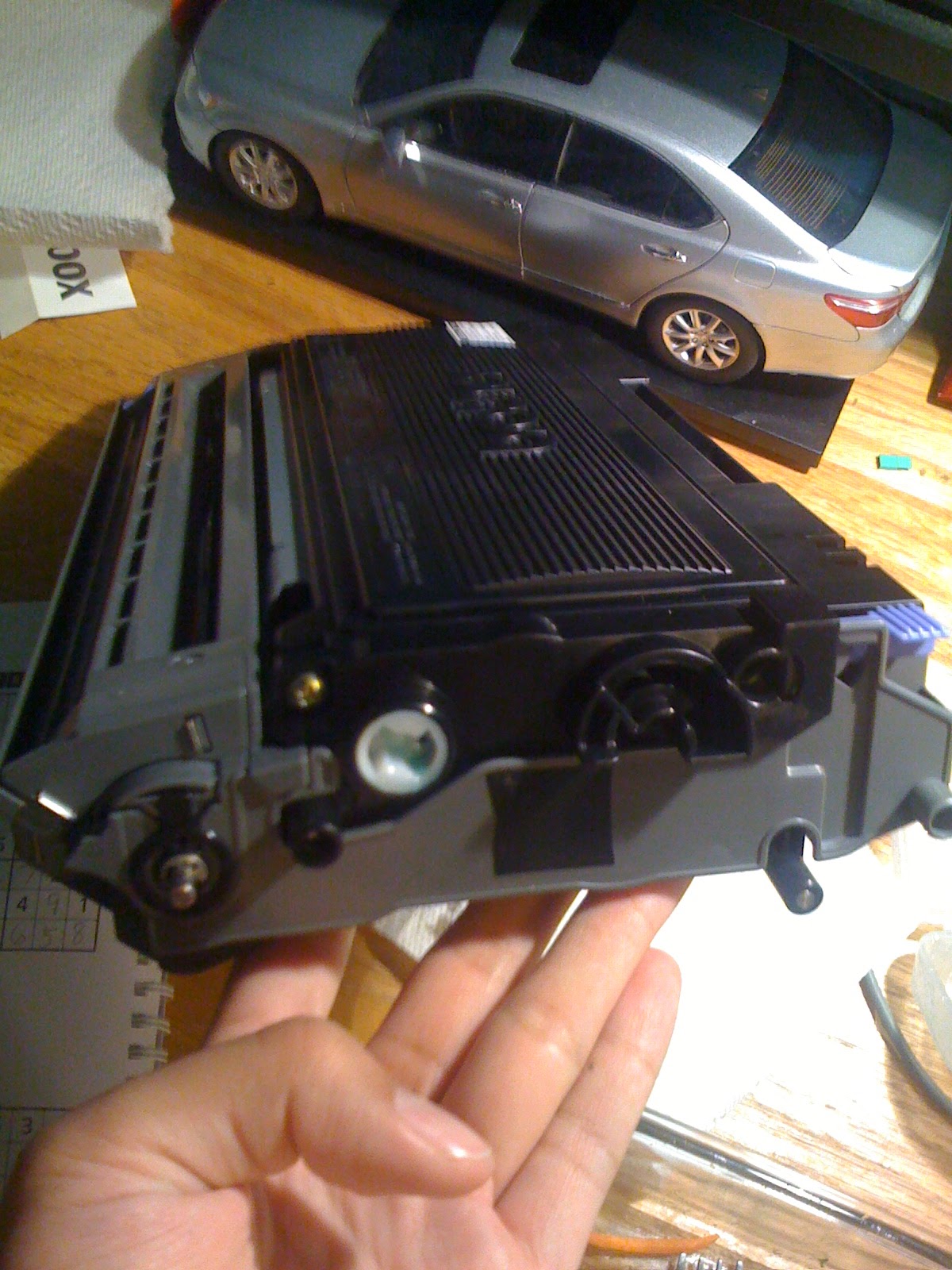
Yes. The cartridge isn't actually empty; the printer, a Brother HL-2040 (a laser printer my dad purchased a few years ago for $50), is programmed so that when the toner level is below some threshold, will refuse to print any more documents. This means that I'll have to rely on the hall printer or some other Athena cluster printer, whose queue is usually jammed with 20-page articles people need to print for their humanities classes. Well, that's unfortunate.

[Interjection] The clever MIT student would say, ``Well, couldn't you just haul back any printer from the dumpster? They all work...'' To which I would respond: ``Hacking my current printer would be much cooler!''[/Interjection]

Actually not quite. A few years ago, when I was researching this particular printer in my leisure, I came across a highly insightful Amazon review (which I then stored in my Google Notebook):

135 of 136 people found the following review helpful:
Masking Tape Gives TN-350 Toner a Second Life,August 25, 2008
By C. MACPHAIL "cmacphail3" (Solana Beach, CA USA) - See all my reviews
(REAL NAME)       
I get 800 to 1100 extra copies from each cartridge.

After the "Toner Life End" message appears, it refuses to print even one more copy. Offensive...until you show it who's in charge.

Remove the cartridge and find 2 clear plastic port holes, one on each side. The printer shines a light through these to decide when to shut you off. But it's too sudden and too early.

Cover one or both windows with a small piece of masking tape. I get about 3400 copies per cartridge instead of 2400.

I really like Brother printers now that I have taught them some manners.

So I tried it...

Here is the hole on one side (close up).

Here is the hole relative to the cartridge unit.

Here is the hole covered by masking electrical tape.


...and hey, my printer now willingly spits out my biology homework!

The printer is nice and happy! (Green Ready light is on instead of the irksome orange Toner light).

For the keen eye: The processor sitting on my printer is a LGA775 Pentium 4.

Next hack: DIY ADC (female) to DVI (male) adapter! Stay tuned!

23 October 2010

Interesting MacBook Air Notes

I suppose this post is slightly late, but still worth sharing anyway. It's more of an analysis of the new MacBook Airs, rather than a hands-on. In fact, when I went to the CambridgeSide Galleria Apple Store a few hours after the keynote, the only MacBook Air in the store was a lonely 13.3" model. *sad*

This past Wednesday, Steve unveiled new MacBook Airs! It was a nice revision; the computers got smaller, lighter, and faster. Briefly looking through disassembly pictures courtesy of iFixit and hands on reports by Engadget, MacWorld, and Ars, I have notice several small details:
  • The SSD is no longer a 1.8" SATA unit; it is a very long Mini-PCIe card. In theory, you can transplant the unit to a different computer with such a slot and have a very fast, small, and light disk. The unit does have TRIM support, though.
  • The backlit keyboard has been omitted. I suspect it will be reintroduced in the next revision, as with the Aluminum MacBook (Late 2008) to the 13" MacBook Pro (Mid 2009).
  • The IR sensor and sleep indicator have been removed. Not sure why the IR sensor is gone, but I have a theory about the sleep indicator. One of the highly touted features of the computer is instant on and its 30-day standby time. From Jason Snell's report, he says that the new Macs go into deep sleep (hibernate) after it has been [normal] sleeping for a while, and when it is woken up from deep sleep, it does not show the gray loading bar like in other Macs. In essence, the computer has shut down, and other Macs do not pulsate the sleep light while they are in the off state. As for Snell's second observation, the MacBook Air omits the loading bar once awoken from deep sleep because it can jump back to the original state much quickly due to the SSD. Therefore, the MacBook Air can do away with both of those items.
  • The 11" MacBook Air has smaller function keys than the other Mac keyboards. The space between the keyboard and the start of the depression (on all sides but the side closest to the trackpad) has been shrunken considerably.
  • The power button has been moved to the location of the eject button, so the button is no longer aluminum.
  • The last row of keys on the 11" MacBook Air are the same height as the alphanumeric keys. This is a small turnoff for me, as I always appreciated the extra height of the space bar and the function, control, option, and command keys. 
  • The 13" model still uses the shrunken package low-voltage Core 2 Duos, but the 11" uses the shrunken ultra-low-voltage Core 2 Duos. This is the reason that 11" units have lower clocks than their larger siblings. 
  • Both units have stereo speakers! They are located underneath the the left and right sides of the keyboard.
  • Operating temperatures have been reported to be lower, and therefore fan speeds are lower. No more hair-drying (or jet engined) MacBook Airs!
I think that's about it; I kept out the bigger features because those are widely documented. Hopefully this report will be useful to potential MacBook Air buyers! I know for sure that I will be getting a decked out 13.3" MacBook Air in the near future to replace my current laptop. (it's a 5-year-old MacBook Pro!)

19 October 2010

Oh Hey Seagate Answered!

Thank you for sending your Seagate E-mail inquiry.

I understand you purchased Seagate internal drive  ST3400832AS, at swap meet when I entered the serial number 4NF068V3 it is 400 gb drive.  I also noticed it is OEM drive we do not support OEM drives.  However  the  drive may be clipped to a lower capacity, so we need to use a tool to set it to the full capacity.

Please download Seatools for DOS from this page:

http://www.seagate.com/www/en-us/support/downloads/seatools/

It will create a bootable diskette or a bootable CD as you choose.

Choose 'C' to Set Capacity.  That should get the drive back to the correct capacity.

If that fails, please then choose 'Z' to zero-fill (quick) the drive and then click Done.

**WARNING** This will erase all data on this drive.
Then go back and try the Set Capacity once more.


Hmm, interesting. So the response indicates that either (a) the swapfest seller ran the drives and disabled 80GB or (b) Seagate ran the drives and disabled 80GB.

18 October 2010

Oh Snap.

My webserver died. (for the $n^{th}$ time.)

Coincidentally, this morning was Swapfest, a flea market for electronics and hardware. Since this is the last swapfest in 2010, I woke up at 0800 to beat the line. I got there at 0830 after making a stop at BofA to withdraw money. When buyers were allowed to enter at 0900, I made a trip around all the stands to sett what people had. There was EVERYTHING: from circular saws to i7s to oscilloscopes. I picked up a 400GB SATA disk for $30. It's not such a great deal (there was a 2TB disk for $120, but I only had $60 and didn't need such a huge disk), but it's on par with what I can get at Newegg. Plus, I could take it home in 15 minutes and use it!

So I take the drive home, plug it into my webserver, and format it. I was pretty spooked the first time when I saw that fdisk listed the drive as a 320GB unit. I looked at the drive again and the label on it was rather intact like the drive label on any (properly-marked) drive. There were no scuffs or hints that the drive had been re-labeled or whatnot. After installing ArchLinux, I plugged my old disk into the computer and went into the BIOS to change boot settings. I was horrified to see that the drive had a different model number (and of course a different capacity) than what was written on the label.

Um, what?!

The next day, I wrote the following message and submitted it to Seagate's support site.

Hello,

The drive that I bought yesterday at the MIT Swapfest was clearly labeled as a ST3400832AS, a 400GB unit. Upon close inspection, the sticker appears to be genuine; there is no evidence of it being placed sloppily. However, when I plugged it into my computer, the BIOS showed it as a ST3320620AS, a 320GB unit. Doing fdisk -l in Linux also says that the drive is a 320GB unit. I have included two images in the attached zip file: one is the original image my my digital camera and the other is an annotated version of the image showing the BIOS readout and disk drive sticker discrepancy. This is purely unacceptable and abysmal quality control on Seagate's part and I kindly ask for the drive to be replaced with the properly-marked (or better) unit. Thank you and have a nice day.


Because Seagate isn't Apple, I don't really expect them to respond with anything I want (never mind a better drive). The most I expect is a curt message along the lines of  ``Life sucks, have a nice day!'' In any case, stay tuned!

10 October 2010

Life at MIT

Preface: Okay, so it's been approximately two months living at MIT, but life is rather hectic. I do realize that the audience of this blog favors the storytelling-type articles over the technological articles, but you now have a dose of both.

Orientation was for the first week or so. I took two Advanced Standing Exams to hopefully pass out of Multivariable Calculus and Physics II: E&M, which I did. Doesn't it feel nice not having to take physics for the rest of your life? :) Another notable event during orientation was the East side vs. West side water wars, in which East side completely obliterated West side. Oh, those preppy sissies.

Towards the end of orientation was freshmen registration day. Having previously looked through all the classes I would have to take for a Course 6-3 (CS) and Course 15 (Management) double major, I had a decently good idea of my schedule.
  • 3.091 Introduction to Solid State Chemistry
  • 7.012 Introductory Biology
  • 14.02 Principles of Macroeconomics
  • 16.A47 The Engineer of 2020 (Freshmen Advising Seminar)
  • 21W.732 Science Writing and New Media

I walked into my advisor's, Dan Hastings (oh yes, the Dean for Undergraduate Education), office and he and my junior advisor (a Computer Science junior from Illinois Math and Science Academy) shot down my schedule as being completely academically unstimulating for someone of my caliber. I talked with them for a while, told them I liked high performance computing, and eventually got thrown into 6.172 Performance Engineering of Software Systems. Both of them were afraid that I would get utterly obliterated (like Hiroshima after the atomic bomb), but they let me take it anyway. That class took the place of Chemistry, which my junior advisor said was pretty easy and not worth using pass no record. So here was my final schedule:
  • 6.172 Performance Engineering of Software Systems
  • 7.012 Introductory Biology
  • 14.02 Principles of Macroeconomics
  • 16.A47 The Engineer of 2020
  • 21W.732 Science Writing and New Media
I then took the form to the Student Services Center to register for classes!

Now that we are five weeks into the semester, here is a quick summary of my classes:
  • 6.172 is EPIC AWESOME. It's a competitively graded lab-based class, not unlike TopCoder. The material is not difficult to grasp, but working with projects with multiple source files (including a Makefile) is certainly different than trying to jam everything into a main function in USACO or one file in my personal projects. Also, learning how to comment code and write comprehensible documentation has been very useful. The one note about this class is that it requires an enormously huge time commitment: you could always be trying out new algorithms, implementations, or bit hacks to increase the efficiency of your code, but either end up making the code slower or introducing new bugs [1]. BUT THE CLASS IS JUST SO FUUUUUNN!
  • 7.012 is boring. Dr. Bajwa has drilled down the content surprisingly well.
  • 14.02 is interesting, but I don't see how one learns from a 50-minute lecture in which the professor teaches a whole chapter. I would rather spend 90 minutes at home to take notes from the book and later reinforcing by reading the lecture notes.
  • 16.A47 is somewhat interesting. A two hour seminar does get rather boring for me, so I'll end up cracking my knuckles or staring at Dr. Hastings' brass clock for the last half hour. I think the other students in the class think I'm an obnoxious computer-obsessed genius because I either know the answer and am not afraid to blurt it out or just give some nonsensical answer. I try to be humorous though :)
  • 21W.732 is pretty sweet. As its name suggests, we use digital media: our past two assignments were to create an audio clip and video clip that captures the essence of something (not necessarily the same). I was plenty happy to exercise my ninja iMovie and GarageBand skills.
The first wave of midterms were the previous week, which is why I did not publish this post earlier. Okay, enough about classes.

Dorm life has been pretty interesting. I live in East Campus, which is infested by [mostly] EECS and some MechE nerds. Most of the floors enjoy building and destroying things. Tetazoo, the floor below mine, is obsessed with fire. I've already found a few places from which to acquire free but workable hardware (mostly computers, for now). My collection of computers (besides my quadbox and MacBook Pro) includes four Dell Optiplex GX270s, a Power Mac G4 Quicksilver, and a Power Mac G4 MDD. (Hmm should I pick up a Power Mac G4 Sawtooth just to complete my collection?) The Dells will be used for an experimental cluster and the two Power Macs (which I carefully gutted) will be used for case mods: one for my webserver, which currently just sits open on a counter, and the quadbox, which resides in a 15-year-old case (complete with its `Intel Inside Pentium II' and `Windows 95 compatible' stickers!). The Quicksilver Power Mac is my nightstand, on which resides a 17" Dell flat panel I obtained. The MDD Power Mac is at home to be case modded, which is currently underway.

Another notable event was CSW, or CSAIL Students Workshop. It was a day filled with computer science and good food at a resort for anyone with a CSAIL account. Who could resist? Everyone was surprised that I was an undergrad freshman (one person asked if I was a first year PhD candidate XD) and was taking 6.172. =D

One more note: There is a surprisingly small number of people who are both hardware maniacs and have an aptitude in computer science/math. Also, I have yet to meet someone as interested in cars as I am. Maybe it's time to go to MITERS and FSAE (Formula SAE)!

Anyway, instead of blabbering, I present some pictures of my room and other activities:

Bananas on a hook!

 Writing Rickroll lyrics on hall whiteboard.

Oh no! MIT Mobile app says I've fallen out of MIT!

 USB pet rock I got from the Google Tech Talk!

The GM Alternative Energy group brought some of their cars outside of the Z Athletic Center for `show and tell.' Guess who got distracted from going to her makeup swim test on time to talk to an engineer for approximately 15 minutes? =D The above picture is a shot of the Chevy Volt interior.

 Chevy Volt steering wheel and instrument panel.

 GM Fuel-Cell Equinox right-side sticker.

 Front of Chevy Volt.

 Trunk of Fuel Cell Equinox. Notice the huge buldge needed to hold the hydrogen tank.

 Professor Steve Johnson (Applied Math) came to 4th East to ride our RC toilet chair!

 Bayley foraging for something good.

 Free, Free, FREE!
Computers, Computers, COMPUTERS!

 YAYYYYYYYYYYYYYYYYYYYY!

 Carting them back to EC!

 Back to our secret hideout to open this massive Sun box. (That's me unscrewing)

 What do we have here? 2x750MHz Sun Sparcs with 8x256MB RAM! Nice find, Bayley.

 Resort in which CSAIL Student Workshop was held.

 Scott Aaronson and his P vs. NP talk. This slide shows his [infamous] quote: ``If Vinay Deolalikar is awarded the $1,000,000 Clay Millennium Prize for his proof of P≠NP, then I, Scott Aaronson, will personally supplement his prize by the amount of $200,000.''

Heading to the resort's beach for lunch! That guy in the pic is a first year PhD candidate in CS. He did his undergrad at Harvard in CS and was Mark Zuckerberg's CS II teaching assistant!

 It's a BEACH!

 ITA's tech talk. Apparently they do some pretty neat stuff (i.e. NP-complete problems).

 Awesome error message in ITA's iPhone app.

 Lobster for dinner!

 Martin Rinard's closing presentation.

 Payoff vs. Intelligence graph, part I.

 Payoff vs. Intelligence graph, part II.

 Error message on Stata flat panel TV. This is the first MIT-owned computer running Windows that I've seen.

 I walked past Sloan as I headed to…

 Microsoft! 1 Memorial Drive, Cambridge, MA 02139.

 Checkers on Microsoft Surface. The touch screen requires a bit of effort to use.

 Cupcakes! Quiznos was catered for dinner.

 Trying out Xbox Kinect (Project Natal). It works really well and is much more intense than Wii games.

 Steve Sinofsky's Tech Talk. I was surprised that he touched on points made in a blog post I read earlier :)

 Here is my desk. Maybe I should clean it up.

 Here is my keyboard. I have two more split keyboards (that I found in the dumpster, of course) sitting in my drawer if anyone wants to use them :)

 Here is my hamper and stuff I got at MIT. I can be lazy and work at my bed now! [2]

 Here is my dresser. It has more electronics than clothes. I discovered that clothes belong on a clothes rack because electronics don't. 

 Here is stuff on top of my dresser. I think I need more real estate.

 Here I am looking at four different source files of evilwm. Vim split is pretty awesome.

 Here is where I sleep. I used to have an ethernet cord running on top of my bed. ULTRA NERDISM

 Here is the Power Mac G4 Quicksilver I hauled home by myself. The trick to carrying it is to *not* hold it by the handles, but to carry it by your side and support it from the bottom.

That's it for now!

[1] The commitment part is irrelevant for me because I'm limited to 54 units of class!
[2] Theoretically, I could use my laptop, but it's not a foot away and is not guaranteed to have power. I'm lazy :)